
Powerdirector Hotkeys

POWERDIRECTOR HOTKEYS LENOVO T440S Fn Lock=Esc, Fn Alt, H: Open customize Hotkeys panel =: zoom in on timeline - (next to + key):zoom out on timeline Ctrl Left, Ctrl right: previous or next clip in track , . (comma and period): previous/next frame/sec/etc. Shift, left arrow: go to left marker Shift, right arrow: go to right marker Shift, m: Add marker at current timeline position! Alt, left arrow: move timeline object 1 frame left Alt, right arrow: move timeline object 1 frame right Alt, up arrow:next second Alt, down arrow: previous second Ctrl, F: fast forward Home/End: Beginning or End of timeline or clip. Ctrl, Backspace: Mute on/off Ctrl, U: show Powerdirector volume slider Tab: Switch between Timeline and Storyboard mode F3: Switch to Media room F: Full screen Ctrl + T: Split clip at current timeline slider position F2: Modify (selected clip in PIP/Particle/Title Designer) F7: Switch to Title Designer F8: Transition Room F9: Audio Mixing Room Page Up: Switch to Clip Mode Page Down: Switch to Movie mode Shift, X: Cut and leave gap Ctrl, Alt, X: Cut and move clips on same track Alt, X: Cut and move all clips after removed clip Alt, P: display project…
Continue ReadingPowerdirector Hotkeys

How To Transfer Zhiyun Smooth-Q Videos To Google Drive

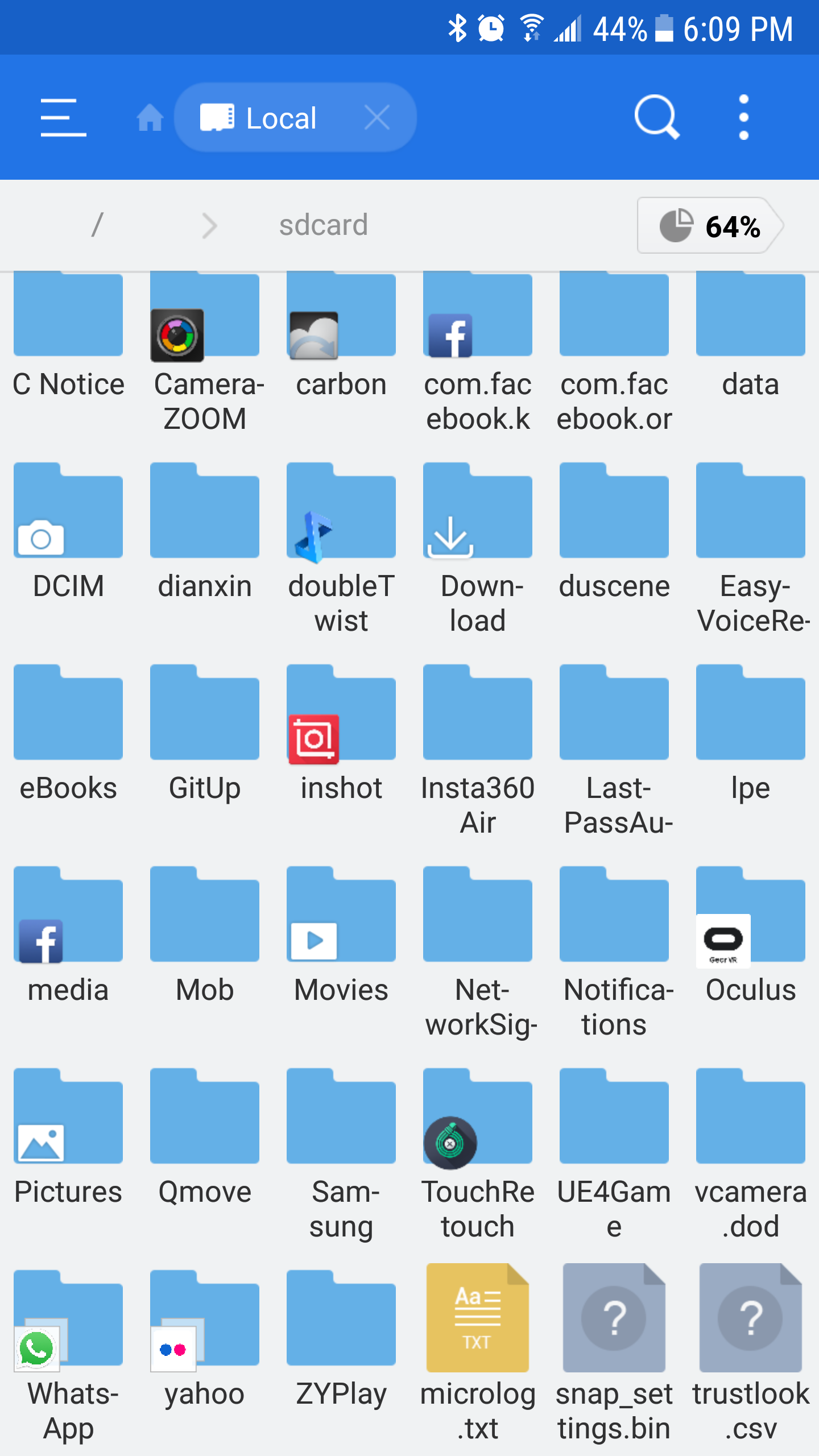
I'm using a Samsung S6 with the Zhiyun Smooth Q gimbal. The new Zhiyun ZY Play is the companion app. This app replaces their Zhiyun Assistant app. The problem is Zhiyun ZY Play saves the videos recorded with the app's camera in it's own folder but doesn't allow upload to Google Photos or sharing with the camera camera app. It's necessary to use the ZY Play camera to access the more advanced features like motion hyperlapse. I offload all my videos to Photos for a bunch of reasons. Save storage on the Samsung S6 (no SD card option on this phone) and as backup storage. I later download the video from Photos for editing later. Here's how I get around it. What you need to do is transfer photos or videos to the camera folder and from there you can upload to Photos. So use a file explorer app like ES File Explorer and look for sdcard/ ZYPlay folder, select the file and move it to sdcard/ DCIM > Camera folder. From there you can upload the videos or photos to Google. Alternatively you can use the Samsung My Files app. Open My Files and choose the Videos icon, select…

Continue ReadingHow To Transfer Zhiyun Smooth-Q Videos To Google Drive

Last Chance to Get Windows 10 For Free

Microsoft officially stopped giving free Windows 10 upgrades way back in July 2016. However, they left an easy loophole for anyone who was late to the party but still wanted a free upgrade. They allowed anyone using their Assistive Technologies to upgrade for free. The Assistive Technologies make computers easier to use for people with disabilities. Some of those tools areĀ Narrator, a screen-reader app that vocalizes text; Magnifier, a digital magnifying glass for those with poor vision; and Speech Recognition, which allows you to control your PC using your voice alone. Even if you did not need those technologies, Microsoft gave you an easy way to get the Windows 10 update by visiting this page and upgrading their version of Windows. Now, MS will be sunsetting that option and as per the pageĀ free upgrades for those who need assistive technologies will end on December 31st, 2017.Ā  (The original extension was due to new assistive technologies not showing up till the July 2016 update.)

Continue ReadingLast Chance to Get Windows 10 For Free

The Only Chrome Tab Manager You Need

Soooooo many Chrome tab managers in the Chrome store but after researching and downloading and sampling half a dozen I've settled on one that does everything I need. Too many Chrome tab managers can only manage, sort or group tabs from a single window. Being highly disorganized and preferring apps and sites one click away I typically have multiple windows with tabs open. What I needed was something that can just quickly kill tabs across multiple windows. I finally found it in Tabli. It groups open windows with their tabs at a glance where I can quickly kill tabs I no longer need. Some may like to organize or group open tabs for later. I hardly ever do that so this is the perfect chrome extension for that purpose. Even the ones that can save grouped tabs cannot do it across multiple windows so that adds to the inconvenient factor for me.

Continue ReadingThe Only Chrome Tab Manager You Need

Adding A Background Color and Dropshadow To Astra Theme Header

Astra is the new kid on the block of lightweight, easily customizable Wordpress themes along with OceanWP and the one that started this trend Generatepress. All the free version of these themes are already quite powerful out of the box but the pro versions offer a lot more customizability. I would say OceanWP's free version right now has the most features out of the box. This site actually runs on Astra. I chose it more for it's future abilities and it's claim to be the fastest Wordpress theme. I wanted custom background color and a thin dropshadow under the header and found there was no setting in the customizer to do that. Instead you will need to go into Appearance/Customize/Additional CSS In there just add this piece of code. .main-header-bar { background: #f4c842;box-shadow: 0px 3px 3px #b8b8b8; } The CSS box shadow property sequence is horizontal shadow size, vertical shadow size, the blur spread size and shadow color.  

Continue ReadingAdding A Background Color and Dropshadow To Astra Theme Header

Changing WordPress Site Title Color in OceanWp

If you are not using a logo on your Wordpress theme and just have text for the site title or sitename, here is where you can change the site name color in the OceanWP theme. In the OceanWp Customizer (Wordpress's Appearance/Customize) go to Header/Logo section and scroll down to the Color setting and use the color picker or type in your hex value. This will change the text color in the header.

Continue ReadingChanging WordPress Site Title Color in OceanWp